Skip to content
A port operations manager in an evergreen jacket overlooking a busy container port at sunrise

Daysli Shore · For maritime businesses

Your maritime business. One professional link. Every opportunity within reach.

Make it easier for shipowners, operators and maritime clients to reach your business.

Present your services, receive structured enquiries, manage meeting requests and connect with potential customers through one professional Daysli page. Whether you run a port agency, supply marine fuel, broker vessels or provide technical services, give customers a clear way to start doing business with you.

No card needed. Nothing is charged when the trial ends. Set up your page in minutes.

  • Port agents
  • Bunker suppliers
  • Shipbrokers
  • Marine service providers

A better first impression

When an opportunity arrives, make it easy to respond.

Maritime business moves across ports, time zones, vessels and companies. Important enquiries often arrive through scattered emails, messages and calls.

Daysli brings the first point of contact into one organised place. Your customers understand your services, give the information you need and ask for a conversation, without searching through several channels.

You stay in control of every enquiry and booking request.

A port agent, a ship operator and a marine services coordinator planning a vessel’s arrival by the harbour window

One page, four business tools

Everything a client needs to start working with you.

  • 01

    Your professional presence

    A page at daysli.com/yourname with your maritime role, an introduction to your services and the ports you cover, in your own words, and the ways clients can reach you.

  • 02

    Structured client enquiries

    Ask for what matters: vessel name and IMO number, ports, dates, fuel grades, quantities or service requirements. A form asks up to eight questions of your own.

  • 03

    Meeting requests on your terms

    Show the times you are free and receive booking requests. Accept, decline or suggest another time before anything is confirmed; an accepted time goes into your Daysli calendar.

  • 04

    Business opportunities

    Publish service listings in Daysli Opportunities with the location, ports and services you cover, and receive enquiries from Daysli members in your Daysli Inbox.

Built around maritime professionals

Made for the way your trade starts a conversation.

Port agents

From the first port call enquiry to the next vessel arrival.

Owners, managers and operators send the vessel’s particulars, the ports and the expected arrival through your own enquiry form. Present your agency services and the ports you cover in one place.

Create your port agency page

Bunker suppliers

Make marine fuel enquiries clear from the beginning.

Buyers give the fuel grade, quantity, delivery port and delivery window your form asks for. On an Opportunities listing you can publish indicative bunker prices, always shown as indicative, never as a binding quotation.

Create your bunker supply page

Shipbrokers

Make the next commercial conversation easier to begin.

Give owners, charterers and counterparts a professional contact point for enquiries and meeting requests, while you keep control of your availability and every answer.

Create your shipbroker page

Marine service providers

Make your specialist services easier to reach.

From chandlery and repairs to surveys, crew services and technical assistance, customers explain what they need before your first reply.

Create your marine services page

From first contact to meaningful business

Your clients should spend less time finding you and more time working with you.

  1. Discover

    A client opens your Daysli page or your Opportunities listing.

  2. Enquire

    They send their requirements through your enquiry form, or ask for a time to talk.

  3. Connect

    You review the request in your Inbox, reply, and accept a meeting or suggest another time.

  4. Continue

    Keep the conversation going in Daysli: replies in your Inbox, Daysli Mail and Daysli Ring.

No account is needed to send an enquiry, a form or a meeting request from your page.

An enquiry on an Opportunities listing comes from a signed-in Daysli member, so both sides know who they are talking to.

Experience it first

See what your customers will see.

Open a sample page for a fictional port agent: her services, the call clients can book, her working hours and her port call enquiry form. It is a preview drawn in your browser; nothing on it is sent anywhere.

Example: a port call enquiry form

The questions are yours to choose. These are the ones in the sample.

  • Vessel nameShort text
  • IMO numberIMO number, checked
  • Port of callShort text
  • Expected arrivalDate
  • Services neededLonger text
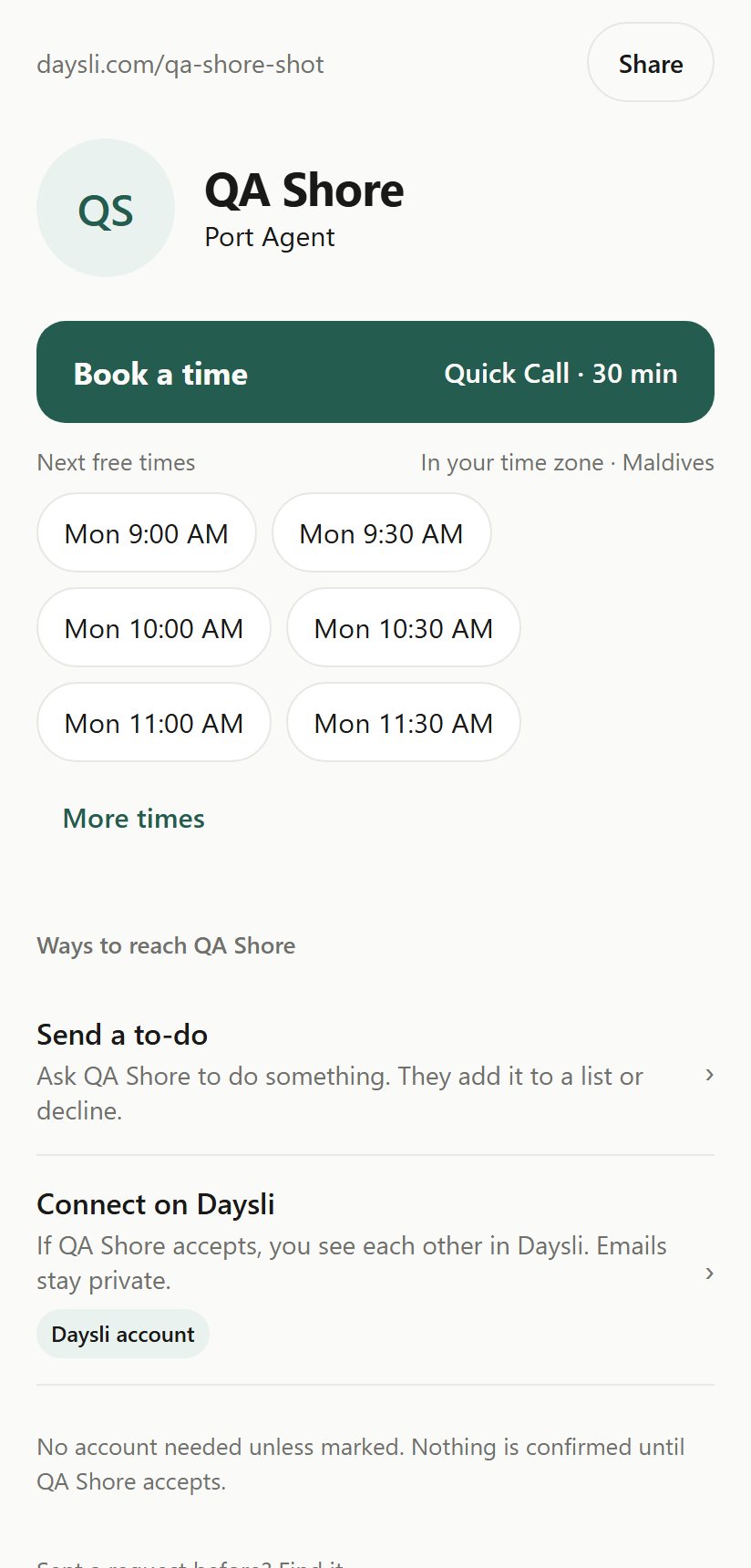
A Daysli professional page: the name and role Port Agent, Book a time with the next free times in the visitor’s time zone, and ways to reach them.
A real Daysli page, on a phone (Daysli’s test account).
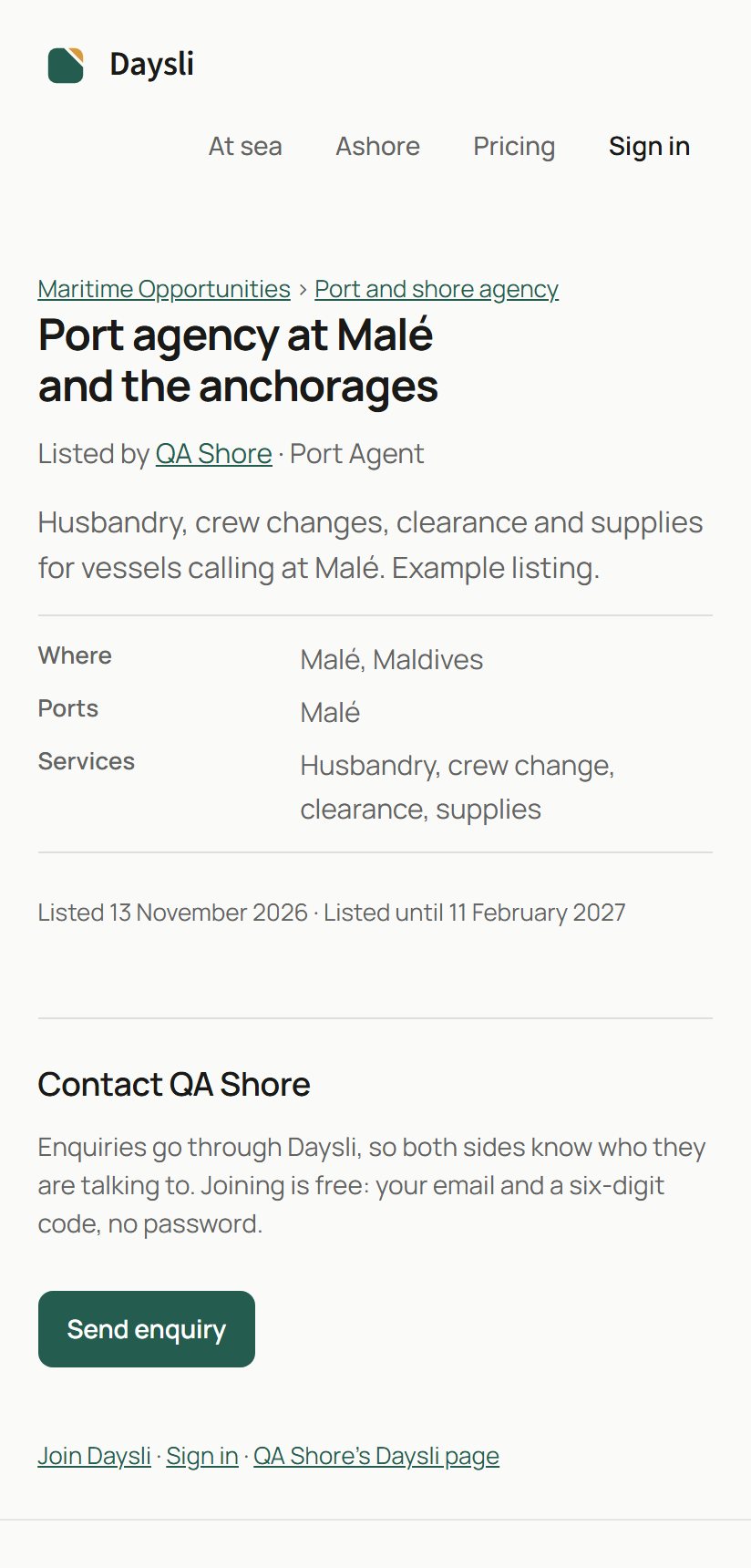
A listing on daysli.com: Port agency at Malé and the anchorages, who listed it, where, the services, and Send enquiry.
A real Opportunities listing (an example listing).

Get started in minutes

A professional business presence without complicated setup.

  1. Step 1

    Create your account

    Sign up with your email and a six-digit code; there is no password. Your 90-day trial starts with it, without a payment card.

  2. Step 2

    Make it yours

    Choose your page address, introduce your services and the ports you cover, write your enquiry questions and set the times you are available.

  3. Step 3

    Share your link

    Add your Daysli address to your email signature, WhatsApp conversations and LinkedIn profile, and publish your services in Daysli Opportunities.

Pricing

Start building your maritime business presence today.

90 days free

No payment card needed, and nothing is charged when the trial ends. Your trial includes everything in Daysli Shore and Daysli Sea. After it, choose the plan that supports your business.

Daysli Shore

US$14.99 a month

  • Your professional page, enquiries, forms and booking requests
  • Listings in Daysli Opportunities
  • Company and vessel pages
  • Daysli Ring and Daysli Mail

Paddle shows the price in your currency, with any tax. Renews every month until you cancel; cancel any time in Settings › Plan. Within 14 days of the first payment you can withdraw for a full refund.

Without a plan after the trial your account becomes read-only. Your information is kept, and your public page and listings are hidden until you choose a plan.

Questions

Frequently asked questions

Can my customers contact me without joining Daysli?

Yes, through your page. Visitors send enquiries, form requests and meeting requests from daysli.com/yourname without a Daysli account; they leave a name and, if they like, an email address to hear back. Enquiries on an Opportunities listing are different: they are sent by signed-in Daysli members, and joining takes an email address and a six-digit code.

Can customers book a meeting automatically?

No. Every request waits in your Inbox until you accept it, decline it or propose another time.

Can I choose the information requested from clients?

Yes. A form on your page asks up to eight questions of your own: short or longer text, numbers, dates, a choice from your options, or an IMO number, which is checked as it is typed. A form can stand on its own or be asked when someone books a time.

Can I list my maritime services?

Yes. Daysli Shore includes publishing listings in Daysli Opportunities: port and shore agency, bunker supply, chandlery, repair, offshore and other maritime services, with the location, ports and services you cover. Your 90-day trial includes it too.

What happens after the 90-day trial?

You choose a plan if you want to keep going. If you do not, nothing is deleted: your account becomes read-only, and your public page and listings are hidden until you choose a plan, when everything comes back as it was.

Does Daysli charge me automatically after the trial?

No. The trial needs no card and nothing is charged when it ends. You are charged only if you choose a plan and authorise the payment yourself; a plan you choose then renews every month until you cancel it in Settings › Plan.

What is the difference between Daysli Sea and Daysli Shore?

Both include your page, enquiries, forms, booking requests, Daysli Ring and Daysli Mail. Daysli Shore (US$14.99 a month) adds publishing Opportunities listings and creating and running company and vessel pages. Daysli Sea (US$9.99 a month) adds the Daysli app for Android. You can hold both.

Daysli Plans Terms · Refund Policy · Daysli Opportunities · Daysli Shore

Your next maritime opportunity could start with one link.

Give clients a professional way to discover your business, send their requirements and ask for a conversation.

No card needed. Nothing is charged when the trial ends. Your business, your page, your control.

The photographs on this page are AI-created illustrations. The phone screens are real Daysli screens.